User Guide
How Your Starlink Mini Rental Works
Your complete guide to using the Starlink Mini. Rates and kit contents are on the pricing section of the homepage.
Watch: How to set up your Starlink
Getting Connected
Connecting to Starlink is simple and works just like any other WiFi network. You do not need to own the Starlink device to connect to its WiFi. Once the Starlink is powered on and has a clear view of the sky, anyone with the WiFi name and password can connect.
Your WiFi credentials will be emailed to you and include:
- Network Name (SSID)
- WiFi Password
Once connected, you can verify your connection by running a speed test. Expect speeds up to 200 Mbps download with low latency, perfect for video calls, streaming, and remote work.
Unlimited Data
Your rental includes an unlimited data plan. There are no data caps, throttling, or overage charges. Use as much data as you need for:
- 4K video streaming
- Video conferencing
- Large file downloads
- Online gaming
- Remote work
- Multiple device connections
Using Starlink On The Go
The Starlink Mini is designed for portability. Take it camping, to outdoor events, or anywhere you need reliable internet access. It works great in:
- Campsites and RV parks
- Tailgating and outdoor events
- Remote work locations
- Emergency backup internet
Planning a trip? Read our guide to using Starlink while camping and on road trips.
Using While Driving
Yes, you can use Starlink while driving! The included magnet mount attaches securely to your vehicle's roof. The connection will remain stable as long as the dish has a clear view of the sky. Note: Connection will be interrupted when driving through tunnels or under overhead obstructions.
Stay Connected Anywhere
With Starlink's reliable internet connection, you can stay connected even in the most remote locations:
WiFi Calling
Make and receive phone calls over the internet when you have no cell service
Text Messages
Send and receive texts using WiFi-based messaging apps
Emergency Use
Access emergency services and send location information when off-grid
Starlink provides the internet backbone that enables these services. WiFi calling and messaging work through your phone's built-in features or apps like WhatsApp, FaceTime, or Google Voice.
Common Misconceptions
Myth: "You need a fixed installation"
Reality: The Starlink Mini is fully portable and requires no permanent installation. Set it up anywhere with a clear view of the sky.
Myth: "Starlink only works in certain areas"
Reality: Starlink provides coverage across the continental United States. It works wherever you can see the sky.
Myth: "Weather affects the connection significantly"
Reality: Starlink is designed to work in various weather conditions. Heavy rain or snow may cause brief interruptions, but normal weather has minimal impact.
Myth: "Setup is complicated"
Reality: Setup takes just a few minutes. Point the dish at the sky, power it on, and connect to WiFi. That's it.
Powering Your Starlink
Most people power their Starlink using their car battery, an external battery provided by the customer, or simply by AC power from an external battery.
You must provide your own power source to operate the Starlink. We include the necessary adapters and cables to make this easy.
Option 1: Vehicle 12V Power
The rental includes a 12V DC adapter that plugs directly into your car's cigarette lighter or 12V outlet. This is the easiest way to power Starlink while traveling.
Option 2: External Battery (User Provided)
We provide the necessary cables to connect the Starlink Mini to a portable power station. You'll need a battery capable of at least 100W continuous output. Popular options include:
- • Jackery, EcoFlow, or Bluetti portable power stations
- • Any battery with DC output (12V-48V supported)
- • Minimum 100W continuous output recommended
No additional power source is provided
Power cables are included that allow you to power the Starlink from your car's 12V plug or USB-C port. This works for 95% of customers. If you need to use Starlink away from your vehicle, you must provide your own external battery.
What's Included
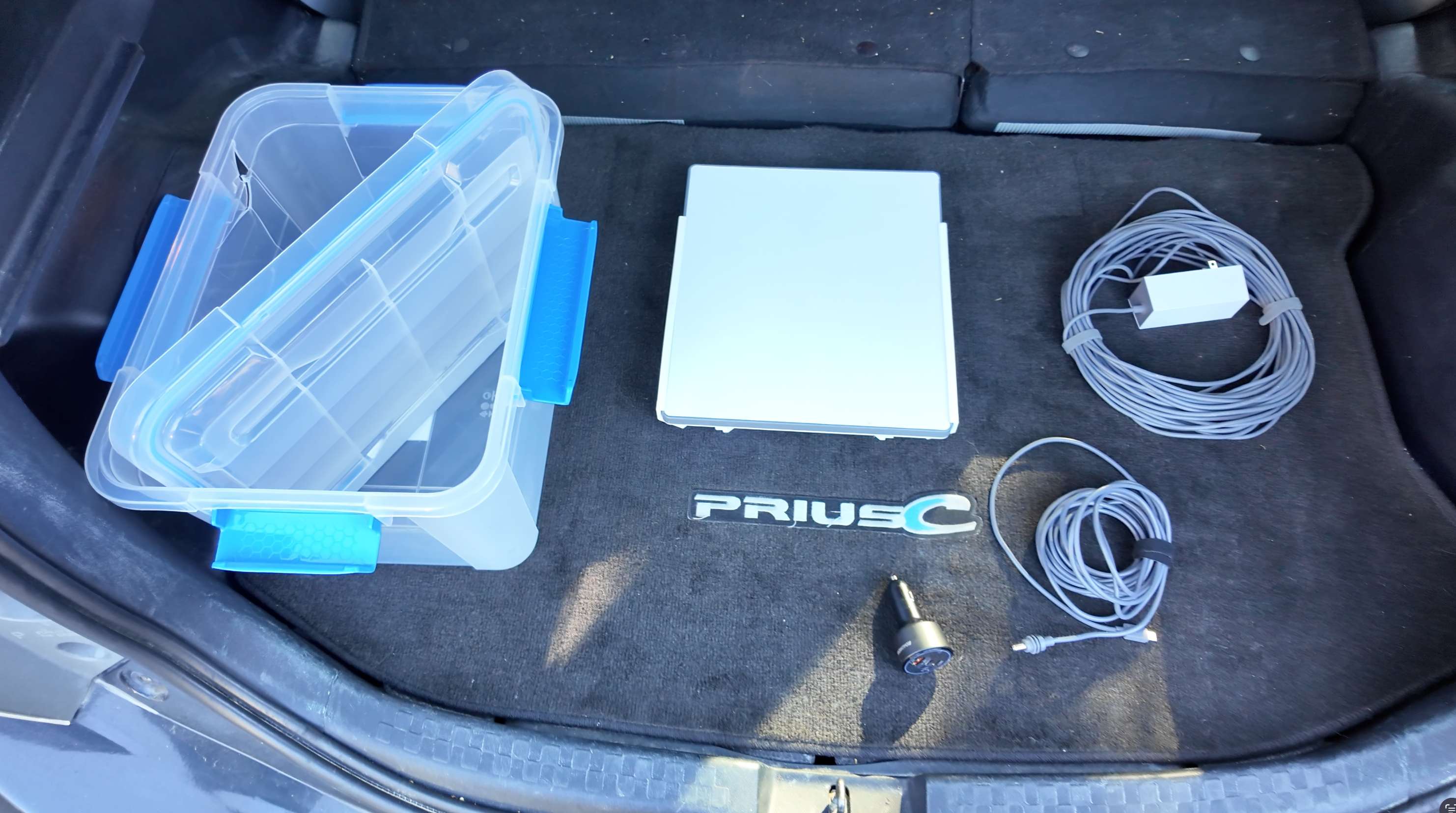
- Starlink Mini satellite dish
- Unlimited data plan included
- 12V car plug adapter
- USB-C car power cable
- Regular AC wall outlet plug
- Magnetic mount for car roof while in transit
- Carrying case for easy transport
Testing Your Connection
Once connected, we recommend running a speed test to verify your connection quality. You can use any speed test service:
- speedtest.net - Most popular option
- fast.com - Simple and quick
- Starlink app - Built-in speed test and diagnostics
Typical speeds range from 50-200 Mbps depending on network conditions and your location. Latency is typically 20-40ms, suitable for real-time applications like video calls and gaming.
Frequently Asked Questions
What is the cancellation policy?
You may cancel your reservation up to one week (7 days) before your rental start date and time and receive a full refund. Reservations made less than 7 days before the start date, including same-day rentals, are not refundable once paid.
Why is payment required up front?
The full rental cost is paid up front to lock in your Starlink for your requested dates. Nothing more is owed at pickup.
How do I pay?
Payment is made securely online by credit or debit card, processed by Stripe. After submitting a booking request, you'll be taken to a secure payment page to pay right away — a link is also included in your confirmation email.
Can I book a rental that starts today?
Yes. There is no advance-notice requirement — you can book a rental that starts today as long as a unit is free and you pay up front. Your card payment is what reserves the unit. If we cannot provide or set up your unit, you will receive a full refund. Otherwise, same-day and short-notice bookings are not refundable once paid, so check your dates before you book.